

• 亿邦公众号
    • APP下载

换季出门怕穿错衣?华为天气“综合指数”桌面卡片 轻松拿捏每日穿搭!

作者:龚作仁 文章来源:Laborer

2026-11-25 10:03

作者:龚作仁 文章来源:Laborer

2026-11-25 10:03

邦小白快读

EN
全文速览

总:换季通勤穿搭和天气查询的实操干货集中在华为天气综合指数卡片。

1.更新15.0.20.300版本后,长按天气指数卡片进入编辑模式,可自由勾选想要展示的指数组合,出门前瞥一眼桌面就能看到四项关键天气指数。

2.以每天通勤为例,可直接勾选体感温度、穿衣、防晒和洗车四项,早上解锁手机就能看到实时指数信息。

3.点击卡片上对应指数还能进入详情页:体感温度详情页用双折线图展示全天体感温度和实际温度对比,24小时冷暖走势一目了然;穿衣指数会结合当日情况给出具体建议,如白天短袖即可、早晚备件薄外套,并提供穿搭灵感、当日幸运色和AI生成穿搭图片参考。

4.卡片还可按需挑选空气质量、紫外线、风力风向、湿度等气象指标,日常通勤或周末户外都够用。

5.体验路径是去应用市场搜索华为天气App并升级到最新版本,再长按图标把综合指数卡片添加到桌面。

总:文章展示了天气工具围绕换季穿搭痛点进行产品功能研发和桌面入口优化的做法。

1.从用户行为看,换季早起上班时用户每天纠结穿什么,小雪后深圳早晚有凉意、白天太阳出来又暖和,昼夜温差让人捉摸不透,只看一个温度数字不够用。

2.产品研发上,综合指数卡片从此前只能显示单项指数,升级为可长按编辑、自由勾选指数组合,桌面直接展示体感温度、穿衣、防晒和洗车四项关键信息,减少用户点进App翻找的路径。

3.详情页强化服务价值:体感温度用双折线图对比全天体感与实际温度,展示24小时冷暖走势;穿衣指数给出具体建议,并加入穿搭灵感、当日幸运色和AI生成穿搭图片,形成从天气信息到穿搭决策的闭环。

4.指标可扩展空气质量、紫外线、风力风向、湿度等,覆盖通勤和周末户外场景。

5.推广上引导用户去应用市场搜索升级,并长按图标添加卡片,以桌面卡片为入口提升使用频次。

总:对卖家可借鉴的是换季和昼夜温差带来的穿搭决策需求,以及天气工具通过桌面卡片提升场景触达的机会。

1.消费需求变化:小雪后深圳早晚能感受到凉意,白天太阳出来又暖和,昼夜温差让人捉摸不透,光看温度数字不够,穿少了早晚容易着凉,穿厚了中午容易闷热。

2.机会提示:华为天气综合指数卡片把体感温度、穿衣、防晒、洗车等指数放在桌面,用户解锁手机即可看到实时信息,适合围绕通勤场景提供即时决策服务。

3.可学习点:产品以可自由勾选指数组合满足个性化需求,穿衣详情给具体建议,并用穿搭灵感、当日幸运色和AI穿搭图片降低用户选择成本。

4.正面影响:体感温度详情页用双折线图展示全天体感与实际温度对比和24小时冷暖走势,帮助用户不被表面温度数字迷惑。

5.文中未直接涉及政策解读、扶持政策或风险提示,主要呈现的是天气入口带来的场景化触达和用户习惯变化。

总:文章对工厂的启示集中在天气类应用的产品功能设计和场景化需求响应。

1.设计需求:综合指数桌面卡片支持长按编辑、自由勾选指数组合,说明产品设计需适配用户个性化展示和桌面快捷查看需求。

2.功能设计:案例勾选体感温度、穿衣、防晒、洗车四项,点击各指数可进入详情页;体感温度详情页用双折线图呈现全天体感温度和实际温度对比,穿衣指数给具体穿搭建议并配套穿搭灵感、幸运色和AI生成穿搭图。

3.商业机会:围绕换季通勤、早晚温差和周末户外,可扩展空气质量、紫外线、风力风向、湿度等气象指标,形成多场景服务组合。

4.数字化启示:通过15.0.20.300版本更新、应用市场升级引导和桌面卡片添加入口提升用户使用频次;AI生成穿搭图片体现内容生成与场景服务结合。

5.电商启示有限,文中主要是天气工具功能,未见生产制造或电商交易环节。

总:文章呈现天气服务从单项指数展示向综合指数桌面卡片和场景化决策服务演进的趋势。

1.客户痛点:换季昼夜温差大,用户早起通勤纠结穿什么,只看一个温度数字不够用,穿少了早晚容易着凉,穿厚了中午又容易闷热。

2.解决方案:华为天气15.0.20.300版本的综合指数卡片,长按天气指数卡片可进入编辑模式,自由勾选指数组合,桌面直接展示体感温度、穿衣、防晒、洗车等四项关键指数。

3.新技术和功能:点击指数进入详情页,体感温度用双折线图对比全天体感温度和实际温度,展示24小时冷暖走势;穿衣指数结合当日情况给具体建议,并提供穿搭灵感、当日幸运色和AI生成穿搭图片。

4.场景扩展:可按需选择空气质量、紫外线、风力风向、湿度等指标,覆盖日常通勤和周末户外。

5.运营启示:通过应用市场升级引导和桌面卡片入口提升触达,服务商可借鉴以即时、可视、可决策的方式解决用户日常痛点。

总:文章从华为天气App功能更新角度展示了平台以桌面卡片优化用户触达和场景服务的做法。

1.平台需求与问题:用户此前桌面天气卡片只能显示单项指数,想了解其他指数信息还得点进App里翻找,存在信息获取路径较长的问题。

2.平台最新做法:15.0.20.300版本推出综合指数卡片,支持长按天气指数卡片进入编辑模式,自由勾选想要展示的指数组合。

3.运营管理:以每天通勤为例勾选体感温度、穿衣、防晒和洗车四项,解锁手机一眼看到实时指数;点击指数进入详情页,提升功能使用深度。

4.服务整合:体感温度详情页用双折线图展示全天体感与实际温度对比及24小时冷暖走势;穿衣详情给具体建议,并提供穿搭灵感、幸运色和AI穿搭图片;还可选空气质量、紫外线、风力风向、湿度。

5.推广与风向:引导用户去应用市场搜索升级、长按图标添加卡片,以桌面入口提升活跃;文中未涉及平台招商和风险规避。

总:文章提供了一个天气应用从信息展示走向场景化决策工具的产品案例,可观察工具类应用的功能演进和用户价值。

1.产业新动向:华为天气15.0.20.300版本将桌面天气卡片从单项指数升级为可自由勾选的综合指数卡片。

2.新问题:换季昼夜温差下,单一温度数字不足以支撑穿搭决策,用户面临穿少了早晚着凉、穿厚了中午闷热的日常问题。

3.产品逻辑与商业模式:以桌面卡片为入口,把体感温度、穿衣、防晒、洗车等指数组合展示;点击进入详情页,体感温度用双折线图对比全天体感与实际温度,穿衣指数给具体建议并配套穿搭灵感、幸运色和AI生成穿搭图。

4.启示:天气工具可通过个性化指数组合、可视化详情和AI内容生成,延伸到通勤、户外等场景,并可扩展空气质量、紫外线、风力风向、湿度。

5.政策法规建议:文中未涉及。

声明:快读内容全程由AI生成,请注意甄别信息。如您发现问题,请发送邮件至 run@ebrun.com 。

我是 品牌商 卖家 工厂 服务商 平台商 研究者 帮我再读一遍。

Quick Summary

Summary: Practical tips for seasonal-transition commute outfits and weather checks are centered on Huawei Weather’s comprehensive index widget.

1. After updating to version 15.0.20.300, long-press the weather index widget to enter edit mode, where you can freely select the combination of indices to display. A glance at the home screen before leaving shows four key weather indices.

2. For daily commuting, for example, you can select feels-like temperature, clothing, sun protection, and car wash; unlock your phone in the morning to see real-time index information.

3. Tapping the corresponding index on the widget opens a detail page: the feels-like temperature page uses a dual-line chart to compare feels-like and actual temperatures throughout the day, making the 24-hour temperature trend clear at a glance; the clothing index gives specific recommendations based on the day’s conditions, such as short sleeves during the day and a light jacket for morning and evening, and provides outfit inspiration, the lucky color of the day, and AI-generated outfit images for reference.

4. The widget can also be configured with air quality, UV, wind force and direction, humidity, and other weather indicators as needed, sufficient for daily commuting or weekend outdoor activities.

5. To try it, search for the Huawei Weather app in the app marketplace and update to the latest version, then long-press the icon to add the comprehensive index widget to the home screen.

Summary: The article shows how a weather tool develops product features and optimizes its home-screen entry around the pain point of seasonal-transition dressing.

1. From user behavior, during seasonal transitions users struggle every morning with what to wear to work. After Xiaoxue in Shenzhen, mornings and evenings feel cool while daytime sun brings warmth; the day-night temperature difference is hard to judge, and a single temperature number is not enough.

2. On the product side, the comprehensive index widget has been upgraded from showing only a single index to supporting long-press editing and free selection of index combinations, directly displaying feels-like temperature, clothing, sun protection, and car wash on the home screen and reducing the path for users to open the app and search.

3. Detail pages strengthen service value: feels-like temperature uses a dual-line chart to compare feels-like and actual temperatures throughout the day and show the 24-hour temperature trend; the clothing index gives specific recommendations and adds outfit inspiration, the lucky color of the day, and AI-generated outfit images, forming a closed loop from weather information to outfit decisions.

4. Indices can be expanded to air quality, UV, wind force and direction, humidity, and other indicators, covering commuting and weekend outdoor scenarios.

5. For promotion, users are guided to search and update in the app marketplace and long-press the icon to add the widget, using the home-screen widget as an entry point to increase usage frequency.

Summary: Sellers can learn from the outfit-decision demand created by seasonal transitions and day-night temperature differences, as well as the opportunity for weather tools to improve scenario reach through home-screen widgets.

1. Changes in consumer demand: After Xiaoxue in Shenzhen, mornings and evenings feel cool while daytime sun brings warmth; the day-night temperature difference is hard to judge. A temperature number alone is not enough: dressing too lightly risks catching cold in the morning and evening, while dressing too heavily risks stuffiness at noon.

2. Opportunity signal: Huawei Weather’s comprehensive index widget places feels-like temperature, clothing, sun protection, car wash, and other indices on the home screen, so users can see real-time information as soon as they unlock their phones. This is suitable for providing instant decision services around commuting scenarios.

3. What can be learned: The product meets personalized needs with freely selectable index combinations, gives specific recommendations on the clothing detail page, and reduces user choice costs with outfit inspiration, the lucky color of the day, and AI outfit images.

4. Positive impact: The feels-like temperature detail page uses a dual-line chart to show the comparison between feels-like and actual temperatures throughout the day and the 24-hour temperature trend, helping users avoid being misled by surface temperature numbers.

5. The article does not directly cover policy interpretation, support policies, or risk warnings; it mainly presents scenario-based reach and changes in user habits brought by the weather entry point.

Summary: The article’s implications for factories center on product feature design and scenario-based demand response for weather applications.

1. Design demand: The comprehensive index home-screen widget supports long-press editing and free selection of index combinations, indicating that product design needs to accommodate users’ personalized display and quick home-screen viewing needs.

2. Feature design: In the example, users select feels-like temperature, clothing, sun protection, and car wash; tapping each index opens a detail page. The feels-like temperature page uses a dual-line chart to present the comparison between feels-like and actual temperatures throughout the day. The clothing index gives specific outfit recommendations along with outfit inspiration, lucky color, and AI-generated outfit images.

3. Business opportunity: Around seasonal-transition commuting, morning-evening temperature differences, and weekend outdoor activities, weather indicators such as air quality, UV, wind force and direction, and humidity can be expanded to form multi-scenario service combinations.

4. Digitalization implications: Usage frequency is increased through the 15.0.20.300 version update, app-market upgrade guidance, and the home-screen widget addition entry point; AI-generated outfit images reflect the combination of content generation and scenario services.

5. E-commerce implications are limited: the article mainly covers weather tool features and does not show manufacturing or e-commerce transaction links.

Summary: The article presents a trend in weather services evolving from single-index displays toward comprehensive index home-screen widgets and scenario-based decision services.

1. Customer pain point: During seasonal transitions, day-night temperature differences are large, and users struggle with what to wear for morning commutes. A single temperature number is not enough: dressing too lightly risks catching cold in the morning and evening, while dressing too heavily risks stuffiness at noon.

2. Solution: In Huawei Weather version 15.0.20.300, the comprehensive index widget allows users to long-press the weather index widget to enter edit mode and freely select index combinations; the home screen directly displays four key indices: feels-like temperature, clothing, sun protection, and car wash.

3. New technologies and features: Tapping an index opens a detail page. Feels-like temperature uses a dual-line chart to compare feels-like and actual temperatures throughout the day and show the 24-hour temperature trend. The clothing index gives specific recommendations based on the day’s conditions and provides outfit inspiration, the lucky color of the day, and AI-generated outfit images.

4. Scenario expansion: Users can select air quality, UV, wind force and direction, humidity, and other indicators as needed, covering daily commuting and weekend outdoor activities.

5. Operational implications: Reach is improved through app-market update guidance and the home-screen widget entry point. Service providers can learn to address users’ daily pain points in an immediate, visual, and decision-ready way.

Summary: From the perspective of Huawei Weather app feature updates, the article shows how a platform uses home-screen widgets to optimize user reach and scenario services.

1. Platform needs and problems: Previously, the home-screen weather widget could display only a single index; to learn about other indices, users had to open the app and search, resulting in a relatively long information access path.

2. Latest platform practice: Version 15.0.20.300 launched the comprehensive index widget, which supports long-pressing the weather index widget to enter edit mode and freely select the combination of indices to display.

3. Operations management: For daily commuting, for example, users select feels-like temperature, clothing, sun protection, and car wash; unlocking the phone shows real-time indices at a glance. Tapping an index opens a detail page, increasing depth of feature usage.

4. Service integration: The feels-like temperature detail page uses a dual-line chart to show the comparison between feels-like and actual temperatures throughout the day and the 24-hour temperature trend; the clothing detail page gives specific recommendations and provides outfit inspiration, lucky color, and AI outfit images; users can also select air quality, UV, wind force and direction, and humidity.

5. Promotion and direction: Users are guided to search and update in the app marketplace and long-press the icon to add the widget, using the home-screen entry point to increase activity; the article does not cover platform merchant recruitment or risk avoidance.

Summary: The article provides a product case of a weather application moving from information display toward a scenario-based decision tool, allowing observation of the feature evolution and user value of utility apps.

1. New industry development: Huawei Weather version 15.0.20.300 upgrades the home-screen weather widget from a single index to a comprehensive index widget with freely selectable indices.

2. New problem: During seasonal transitions with day-night temperature differences, a single temperature number is insufficient to support outfit decisions. Users face the daily problem of catching cold in the morning and evening if dressed too lightly, or feeling stuffy at noon if dressed too heavily.

3. Product logic and business model: Using the home-screen widget as an entry point, it displays a combination of feels-like temperature, clothing, sun protection, car wash, and other indices. Tapping opens detail pages: feels-like temperature uses a dual-line chart to compare feels-like and actual temperatures throughout the day, and the clothing index gives specific recommendations along with outfit inspiration, lucky color, and AI-generated outfit images.

4. Implications: Weather tools can extend into commuting, outdoor, and other scenarios through personalized index combinations, visual detail pages, and AI content generation, and can expand to air quality, UV, wind force and direction, and humidity.

5. Policy and regulatory recommendations: Not covered in the article.

Disclaimer: The "Quick Summary" content is entirely generated by AI. Please exercise discretion when interpreting the information. For issues or corrections, please email run@ebrun.com .

I am a Brand Seller Factory Service Provider Marketplace Seller Researcher Read it again.

换季这阵子早起上班,每天都在纠结穿什么。尤其小雪刚过,深圳虽然没有北方那么冷,但早晚还是能感受到凉意,白天太阳出来又暖和不少,昼夜温差让人有些捉摸不透。这种时候出门,光看一个温度数字根本不够用,穿少了早晚容易着凉,穿厚了中午又容易闷热,衣服没选对,一天下来都不舒服。

好在把华为天气App更新15.0.20.300版本后,我发现这个“综合指数”卡片真的特别实用。以前桌面上的天气卡片只能显示单项指数,想了解其他指数信息还得点进App里翻找。现在我只需长按天气指数卡片进入编辑模式,就能自由勾选想要展示的指数组合。出门前瞥一眼桌面,四项关键天气指数一目了然。
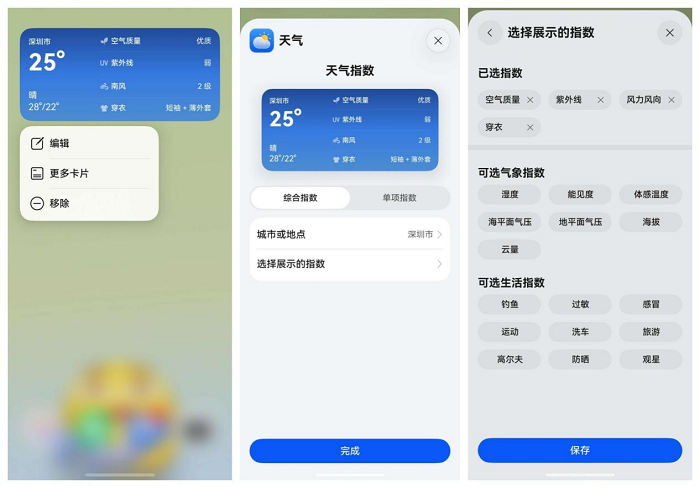
以每天通勤为例,我直接勾选了体感温度、穿衣、防晒和洗车这四项,每天早上起床解锁手机,一眼就能看到实时的各项指数信息。
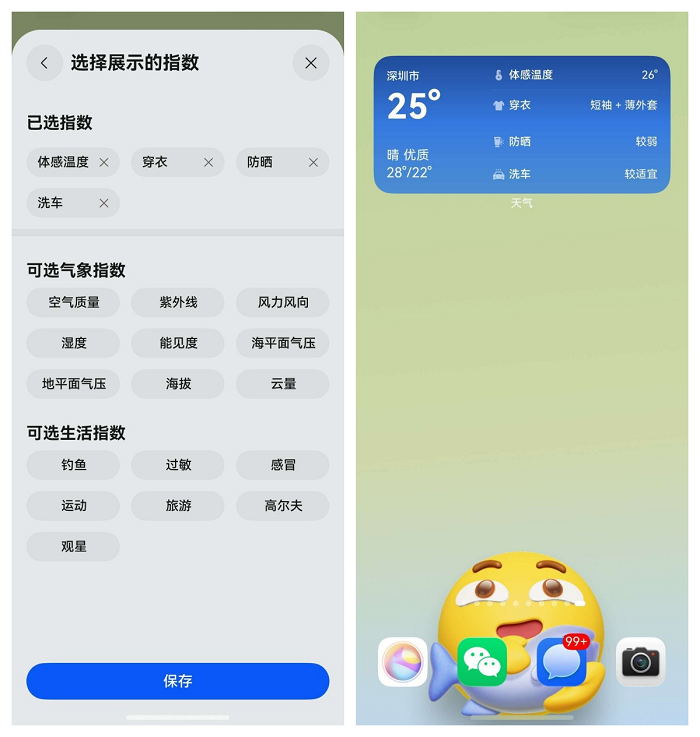
点击卡片上对应的指数,还能进入详情页。比如在体感温度详情页里,会有双折线图将全天的体感温度和实际温度对比清晰展示出来,24小时的冷暖走势一目了然,再也不会被表面的温度数字所“迷惑”了。

点击穿衣指数,系统会结合当日具体情况给出“白天短袖即可,早晚记得备件薄外套”这类具体建议,不用每天早上对着衣柜发愁今天该怎么穿了。如果平时自己不会搭配衣服的话,还可以看看页面内给出的穿搭灵感,不仅有当日幸运色,AI还会自动生成一套穿搭图片供你参考,照着穿基本不会出错。
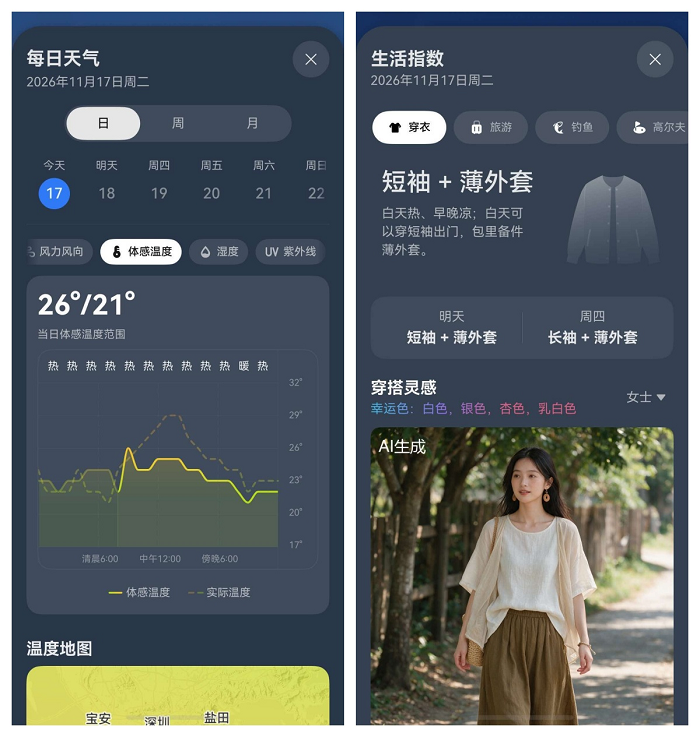
除此之外,卡片里还能按需挑选空气质量、紫外线、风力风向、湿度等气象指标,不管日常通勤还是周末户外都很够用。

想要体验的朋友,不妨现在就去应用市场搜索华为天气App升级到最新版本,然后长按图标把综合指数卡片添到桌面上试试吧。

注:文/龚作仁,文章来源:Laborer,本文为作者独立观点,不代表亿邦动力立场。

【版权提示】亿邦动力倡导尊重与保护知识产权。未经许可,任何人不得复制、转载、或以其他方式使用本网站的内容。如发现本站文章存在版权问题,烦请提供版权疑问、身份证明、版权证明、联系方式等发邮件至run@ebrun.com,我们将及时沟通与处理。

已点赞

+1

{{ praise_text }}

好文章,值得被更多人看到

FAQ回顾

华为天气App综合指数桌面卡片是什么?

华为天气App综合指数桌面卡片是15.0.20.300版本中可添加到桌面的天气指数卡片,支持长按进入编辑模式自由勾选展示的指数组合,让用户无需进入App即可查看多项关键天气指数。

华为天气综合指数卡片支持展示哪些天气指数?

华为天气综合指数卡片可勾选体感温度、穿衣、防晒、洗车等指数,也可按需选择空气质量、紫外线、风力风向、湿度等气象指标,适合日常通勤和周末户外等场景使用。

华为天气App的穿衣指数能提供哪些穿搭建议?

华为天气App穿衣指数会结合当日天气给出具体建议,如“白天短袖即可,早晚记得备件薄外套”;页面还提供穿搭灵感、当日幸运色,并由AI自动生成一套穿搭图片供参考。

如何将华为天气综合指数卡片添加到手机桌面?

先将华为天气App升级至15.0.20.300版本,然后在应用市场搜索华为天气并升级到最新版;之后可长按天气指数卡片进入编辑模式勾选想展示的指数组合,或长按图标把综合指数卡片添加到桌面。

换季昼夜温差大时,华为天气综合指数卡片如何辅助通勤穿搭?

华为天气综合指数卡片可同时展示体感温度、穿衣、防晒等指数;体感温度详情页用双折线图对比全天体感温度与实际温度,24小时冷暖走势清晰可见,穿衣指数则给出早晚添衣等具体建议。

广告

下一篇

跨境电商资源对接

《全球跨境电商服务商资源手册》第二期手册现已发布,触达更多资源,了解跨境服务商信息,欢迎点击链接下载。

了解详情

B站三季度收入83.2亿元 广告收入增长20%至30.9亿元

B站公布截至2026年9月30日的季度财报:三季度,B站总营收达83.2亿元人民币,同比增长8%。毛利润同比提升10%。

直播 二次元 平台 短视频

2026-11-25 10:02:10